Easy Time Management Tips for Work, Students and Parents

Easy time management tips are the ones you can use on an ordinary weekday without a new app or a new personality. Four of them do most of the work: choose three priorities before the day starts, give each one a block of time on the clock, leave open buffer time between blocks, and look back at the week once for about 15 minutes. Start with those four for a week or two. The rest of this guide adds tips for a desk job, for school and for a busy household, and ends with the snags that make people give up.
Pick a time management tip by where you spend your day
Setup and daily times in this table are our planning estimates, not measured results. Start with one row, not all of them.
| Tip | Setup | Each day | Best for | What you need |
|---|---|---|---|---|
| Three priorities | none | 2–3 minutes | everyone | paper or a planner page |
| Time blocks | 10 minutes | 3 minutes | anyone with meetings, classes or shifts | your calendar plus a daily schedule |
| Buffer time | none | none | days that always run over | an empty slot on the schedule |
| Timed work sessions | none | while you work | desk work, studying, writing | a kitchen timer or phone timer |
| Message batching | 5 minutes | none | jobs heavy on email and chat | two or three set times |
| Working back from a due date | 15 minutes per project | none | students, long projects | the due date and a calendar |
| Errand batching | 5 minutes | one block a week | parents, households | one running errands list |
| Weekly review | none | 15 minutes once a week | everyone | last week’s pages |
The three easy time management tips that do most of the work
These three come first because the other tips plug into them. Without a short priority list and a schedule, a timer or a batching rule has nothing to hang on.
Choose three priorities before you open email
A priority is a task that would make the day count even if nothing else got done. Write three before you read a single message, because email and chat hand you other people’s priorities first. Everything else goes on a separate to-do list. Keeping the two lists apart is the whole trick: the to-do list can run to ten items, while the priority list stays at three.
Ranking the three helps on days that fall apart. Our baroque-style aesthetic daily planner labels its three priority boxes must do, should do and could do on four of its five weekday pages. When a meeting runs long, you know which task to drop without thinking about it. The Wednesday page leaves the three boxes unlabeled, so write the labels in by hand if you want them every day.
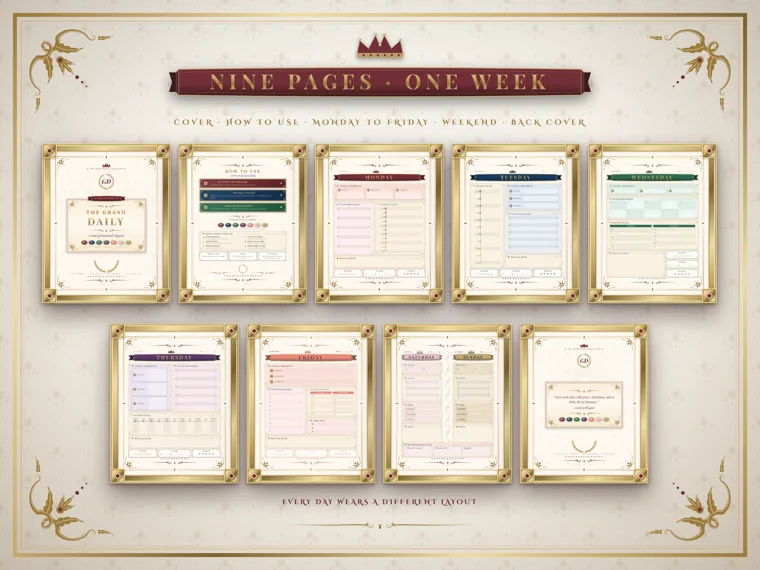
For the five-minute morning routine that goes with this list, including how to copy fixed appointments first, follow our step-by-step guide on how to use a planner.
Give each priority a time block on the clock
A time block turns “sometime today” into “from 10 to 11.” Wikipedia describes timeboxing as the allocation of a maximum unit of time to an activity, and the word that matters is maximum. When the block ends, you stop, note where you got to, and move on. The task gets another block later instead of eating the afternoon.
Put fixed events on the schedule first: meetings, classes, school pickup, a shift. Then place your three priorities in the gaps that are left. If the gaps add up to three hours and the priorities need five, you’ve found the problem at 8 a.m. instead of at 5 p.m. Drop a priority or shrink it now.
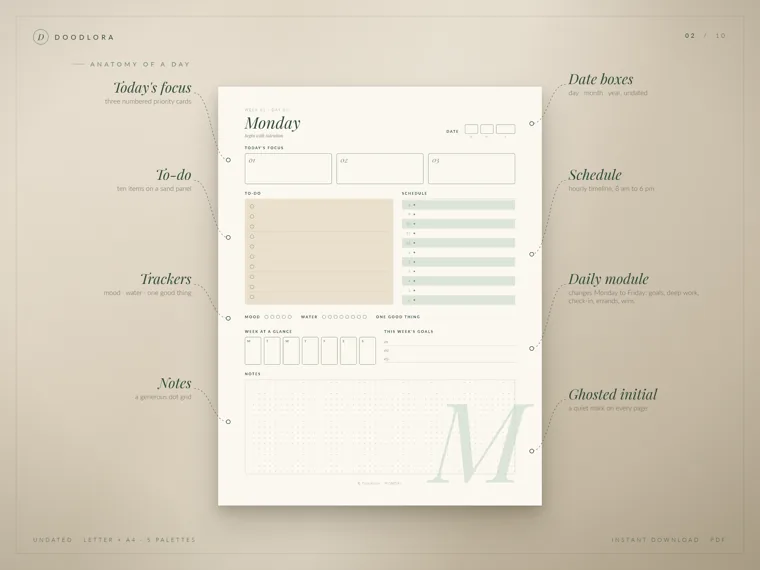
One snag on printed pages: the schedule in our printable daily planner runs from 8 a.m. to 6 p.m. If you work an early shift or study at night, write your own hours over the numbers rather than squeezing the day into slots that don’t match it.
Leave empty buffer time between blocks
Buffer time is a block with nothing in it on purpose. It catches the call that runs over, the printer jam and the child who needs a second pair of shoes. A day planned to the minute breaks at the first delay, and every block after it slides.
A simple rule: leave at least one open hour in a workday, and a 10- or 15-minute gap after any meeting or class. If the buffer goes unused, it becomes free time or a head start on tomorrow. Neither is a waste.
Time management tips for work at a desk
Desk work has a particular problem: the tasks that matter most are long and quiet, and the interruptions are short and loud. These three tips protect the long work.
Work in timed sessions with planned breaks
A timer makes starting easier because you only commit to one session, not to the whole task. The best-known version is the Pomodoro Technique, which Francesco Cirillo developed in the late 1980s. The original method sets a timer for 25 minutes of work, then a short break of 5 to 10 minutes, and after four sessions a longer break of 20 to 30 minutes.
Treat 25 minutes as a starting point. Writing or coding may suit 45 or 50 minutes, and some people prefer 15-minute sessions on a hard day. Whatever the length, keep the break real: stand up, get water, look away from the screen. Checking email during the break pulls the next session’s attention in before it starts.
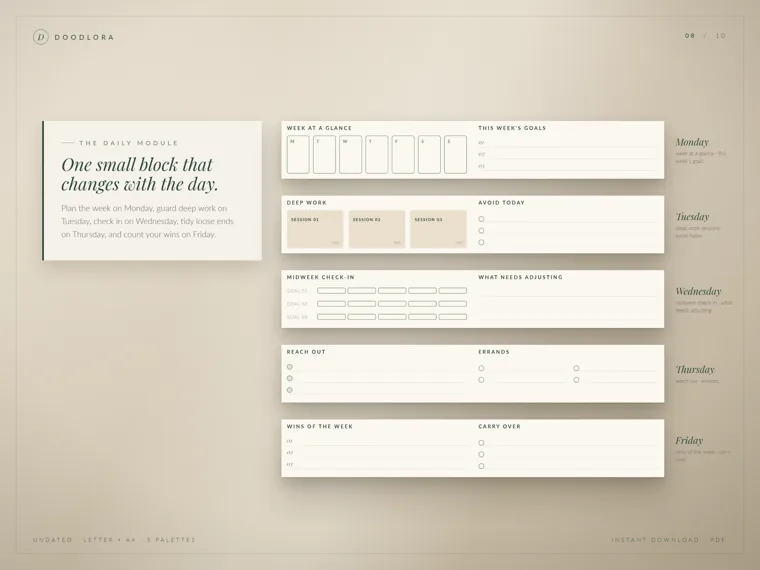
The Tuesday page of our daily planner has three deep work session boxes with a space for minutes. Logging the minutes after each session shows you, within a week, how much focused time a normal day really has. For most desk jobs the number is smaller than people expect, and that changes how much you put on the priority list.
Batch email and messages into set times
Answering every message as it arrives splits the day into tiny pieces. Pick two or three set times to work through your inbox and chat, for example late morning, after lunch and an hour before you finish. Between those times, notifications stay off or muted.
Tell the people who rely on you when you check, so nobody worries. If your job truly needs fast replies, such as support or scheduling, batch only during your timed sessions and leave the rest of the day open. The snag is the “quick look”: opening the inbox to find one file usually means answering five things.
Sort the list with the urgent-or-important grid
When the to-do list is long, sorting beats working top to bottom. The Eisenhower method, named for a quote attributed to Dwight D. Eisenhower, puts each task in one of four boxes by whether it’s important and whether it’s urgent. Wikipedia lists how each box is handled:
| Box | What to do with it |
|---|---|
| Important and urgent | do it now, yourself |
| Important, not urgent | give it an end date and do it yourself |
| Urgent, not important | hand it to someone else |
| Neither | drop it |
The important-but-not-urgent box is where time management pays off. Planning, studying ahead, maintenance and long projects live there, and they only get done if they get a date and a block. If that box is empty on your list, the week is being run by other people’s deadlines.
Time management tips for students
School work comes with fixed due dates, which makes planning easier in one way and harder in another: everything is due at once near the end of a term. These tips spread the load.
Work backward from every due date
When a paper or project is assigned, write the due date in your calendar, then count backward. Give the final draft a day, the first draft a few days, research a week, and choosing the topic a day or two. Each of those steps gets its own date. A ten-page paper due in four weeks becomes four small deadlines instead of one large one.
Do this on the day the assignment is handed out, while the instructions are fresh. Students who wait often discover the research step needs library books or interviews that take time to arrange.
Estimate, then time yourself
Most people guess how long a task will take, and most guesses are short. For one week, write your estimate next to each homework task, then time it. Compare the two columns at the end of the week. If reading a chapter took 70 minutes when you planned 30, plan 70 from now on.
This also works for adults at work. The point isn’t to go faster; it’s to plan with real numbers so the evening doesn’t run out before the list does.
Study in short sessions, then switch subjects
Timed sessions help students too. Two 25-minute sessions on two subjects, with a short break between, tend to be easier to start than one long block on the hardest subject. Put the subject you avoid most into the first session, while you still have energy for it.
Time management tips for parents and busy households
At home, time slips away in small trips, lost items and last-minute surprises. These three tips cut the small losses.
Batch errands into one block a week
Keep one running list of errands, such as the pharmacy, the post office, returns and the hardware store. Then pick one day and one block to run them all, in the order that makes the shortest drive. Our daily planner gives Thursday an errands list and a “reach out” list for calls and messages, which is a handy model: one day a week when loose ends get tied up.
The snag is the errand that can’t wait. Keep it rare by checking the list on the batching day and asking, “Will anything here be urgent before next week?”
Set up tomorrow the night before
Many morning delays are decisions that could have been made the night before: clothes, lunches, bags, keys, the permission slip. Ten minutes after dinner takes them off the morning. Our guide to a night routine for adults covers how to fit this into the evening, and the morning routine ideas guide covers what to do with the time you gain.
Keep one shared calendar for the whole family
Two parents with two separate calendars find out about conflicts too late. Put every appointment, practice, school event and work trip in one shared calendar that both adults check. Older kids can read it too, which saves a lot of “When is my game?” questions. A paper calendar on the fridge works as well as an app, as long as there’s only one.
Easy fixes when you procrastinate or feel overloaded
Even with a good plan, some days you can’t get started and some weeks hold too much. These fixes are everyday habits, not treatment for anxiety, depression or attention problems. If putting things off is affecting your health or your work, talk to a doctor or another qualified professional.
Shrink the first step until it takes five minutes
“Write the report” is hard to start. “Open the file and write the headings” is easy. When a task keeps sliding to tomorrow, rewrite it as the first physical action that takes about five minutes. Once you start, continuing is usually easier than starting was.
Write a short “avoid today” list
A to-do list says what to do; an avoid list says what will steal the day. Write two or three items, such as “no news sites before noon” or “no new projects until the report is sent.” Our daily planner puts an avoid list next to the deep work sessions on Tuesday for this reason. Seeing the list on the page is a reminder at the moment you reach for the distraction.
Track where your time goes for three days
If the day always seems to disappear, write down what you do in 30-minute chunks for three ordinary days. Don’t change anything yet; just record it. Most people find one or two leaks, like an hour of scrolling after lunch or 45 minutes of searching for things. Fix the biggest leak first, then check again in a month.
A 15-minute weekly review keeps every tip working
Each tip above slowly drifts without a check-in. Once a week, on Friday afternoon or Sunday evening, look back at the week’s pages for about 15 minutes and answer three questions: what went well, what to let go, and what next week’s focus is. Those three questions are printed in the weekly review row of our daily planner’s weekend page.
Then carry over unfinished priorities, put next week’s fixed events on the calendar, and choose which time management tip you’ll practice next. Add one tip at a time. Trying five new habits in the same week is the fastest way to drop all of them. The full routine, with a checklist, is step 5 in the planner guide linked earlier.
Common snags when you start managing your time
These are the places where people quit, and the fix for each.
- The priority list grows to eight items. Three is the limit because the list has to fit in the time you actually have. Move the rest to the to-do list.
- The printed schedule doesn’t match your hours. Our daily planner pages print 8 a.m. to 6 p.m. Cross out the numbers and write your own shift or class hours.
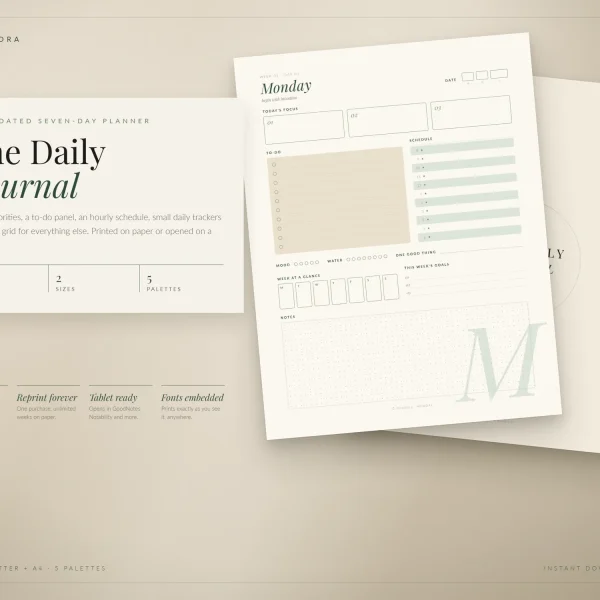
- You skip a few days and feel behind. Undated pages fix this. Both of our daily planners are undated, so you start again on any day without empty dated pages staring back at you. Each one is a nine-page weekly set you print again when the week ends.
- Planning turns into decorating. Colors and stickers are fine, but the daily plan should take about five minutes. If it takes 20, simplify the page.
- Every block is full. Go back to buffer time. A schedule with no empty space isn’t a plan; it’s a wish.
Frequently asked questions
What is the easiest time management tip to start with?
Write three priorities on paper before you open email. It takes two or three minutes, needs no app, and gives the rest of the day something to measure against.
How long should daily planning take?
About five minutes in the morning and five in the evening is enough for most people. A weekly review adds about 15 minutes once a week.
Is the Pomodoro Technique good for everyone?
No single method suits everyone. The original Pomodoro pattern of 25 minutes of work and a short break is a good place to start, and you can change the length to 15, 45 or 50 minutes to fit the task and your attention.
Printables from this article

Related articles
Printable Planners
How to Build a Workout Plan: Weekly Schedule & Template
A step-by-step way to turn a fitness goal into a weekly workout schedule, with 3-, 4- and 5-day sample weeks, a logging routine and simple rules for progressing, resting and restarting.
Printable Planners
How to Create a Home Maintenance Checklist: Monthly & Yearly
A step-by-step way to build a home maintenance checklist that fits your house, with monthly, quarterly, seasonal and yearly jobs and where the safety intervals come from.
Printable Planners
Self Care Ideas for Mental Health: Relaxing Habits & Tracker
Sixteen small, non-clinical self-care habits sorted by what you need, from sleep and walks to boundaries and a joy list, plus a low-pressure weekly check-in.