 1 / 7
Wedding Budget Spreadsheet for Excel and Google Sheets: 16 Tabs with 8 Category Budgets, Vendor Quote Compare, Payment Timeline, Who Pays What and a Payment Log
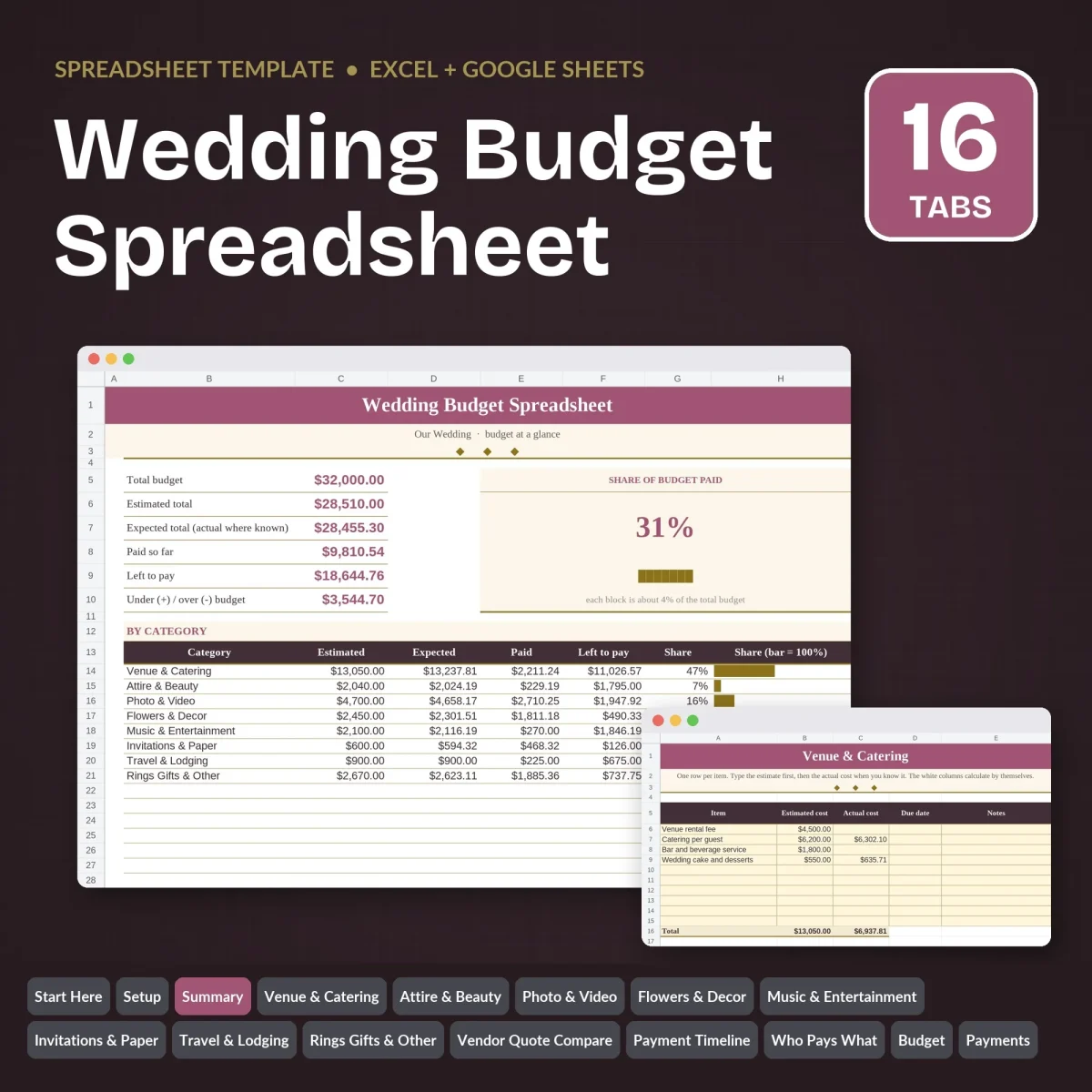
A wedding budget split the way wedding bills arrive: venue and catering, attire, photo, flowers, music, paper, travel and rings each get a tab of estimates and real prices. Deposits you log update every item's balance, and side tabs compare vendor quotes and record what each family member is chipping in.
$2.99
Buy any 3 or more printables and save 20% at checkout.
- Download right after payment — link works for 30 days, up to 5 downloads
- Files arrive as a ZIP with your license PDF inside
- Secure checkout by Stripe · Refund policy
This wedding budget spreadsheet gives each part of the wedding its own tab, so the caterer’s quote, the florist’s deposit and the band’s final payment each sit with their own category instead of in one long list.
The eight categories
Venue & Catering, Attire & Beauty, Photo & Video, Flowers & Decor, Music & Entertainment, Invitations & Paper, Travel & Lodging, and Rings Gifts & Other. Each tab has 10 rows. The blank copy suggests a few items to get going, like catering per guest, a hair and makeup trial, an engagement photo session, a ceremony arch and draping, a hotel block deposit and the officiant fee. Type over them or clear them. If your categories are different, rename them on Setup.
On every item you enter the estimate first and the actual price once the contract is signed, with a due date and a note if you want them.
Deposits and balances
Wedding vendors rarely get paid in one go. Each time you pay something, log it on Payments with the date, the item picked from a dropdown, the amount, who you paid and their phone or email. Back on the category tabs, every item then shows what’s paid, what’s still owed and a status of Paid, Part paid or Not paid. The Budget tab lines up all items in one place, marks how far each actual price landed under or over its estimate, and flags a duplicate item name or an overpayment.
Seeing the whole wedding
Summary compares your total budget with the estimated total, the expected total (real prices where you have them) and what you’ve paid. It shows the share of the budget already paid and a by-category table with each category’s share of the wedding. The sample works with a $32,000 budget: $9,810.54 is paid, venue and catering take 47% of the expected cost, and the wedding is on track to finish $3,544.70 under.
Three planning tabs
- Vendor Quote Compare: category, vendor, quote and deposit side by side, with a Booked column, for the stage before you sign anything.
- Payment Timeline: each upcoming payment with the vendor, due date, amount and whether it’s paid.
- Who Pays What: which costs the couple covers and which ones parents or other family are contributing to, with a Received column.
These three are simple lists with totals at the top (60 rows each), separate from the budget math.
Opens in Excel 2010 or newer, no macros. If you plan in Google Sheets, put the .xlsx in your Google Drive first and open it from there.