 1 / 7
1 / 7
Aquarium Wallpaper: 16 Goldfish and Reef Grotto Fish Scenes in Square and Widescreen Sizes
Sixteen aquarium scenes with the fish already in the picture: eight close views of long-finned goldfish among plants and bubbles, and eight reef grottos with small fish drifting over pale sand. Each scene comes in two 16:9 sizes and a square crop, and fills one page of the Letter and A4 PDFs.
$3.99
Buy any 3 or more printables and save 20% at checkout.
- Download right after payment — link works for 30 days, up to 5 downloads
- Files arrive as a ZIP with your license PDF inside
- Secure checkout by Stripe · Refund policy
These aquarium wallpapers are 16 finished underwater scenes in which the fish are part of the picture. There is no empty, fish-free version of any scene.
Goldfish tanks and reef grottos
The set splits into two groups of eight that feel quite different on a screen.
Goldfish, designs 1 to 8. Orange and white fancy goldfish with long, see-through fins swim close to the viewer, between green water plants, gravel and streams of bubbles. The light changes from scene to scene: bright teal water in Sunlit Goldfish, sun shafts slanting in from the top left in Morning Refractions, warm golden light in Amber Hour, a thick wall of green plants above a pebble floor in Jade Garden. Blue Glass and Silver Veils are the two dark ones, with the fish lit against deep blue and near-black water. Redcap Ripples swaps the orange fish for white ones with red heads.
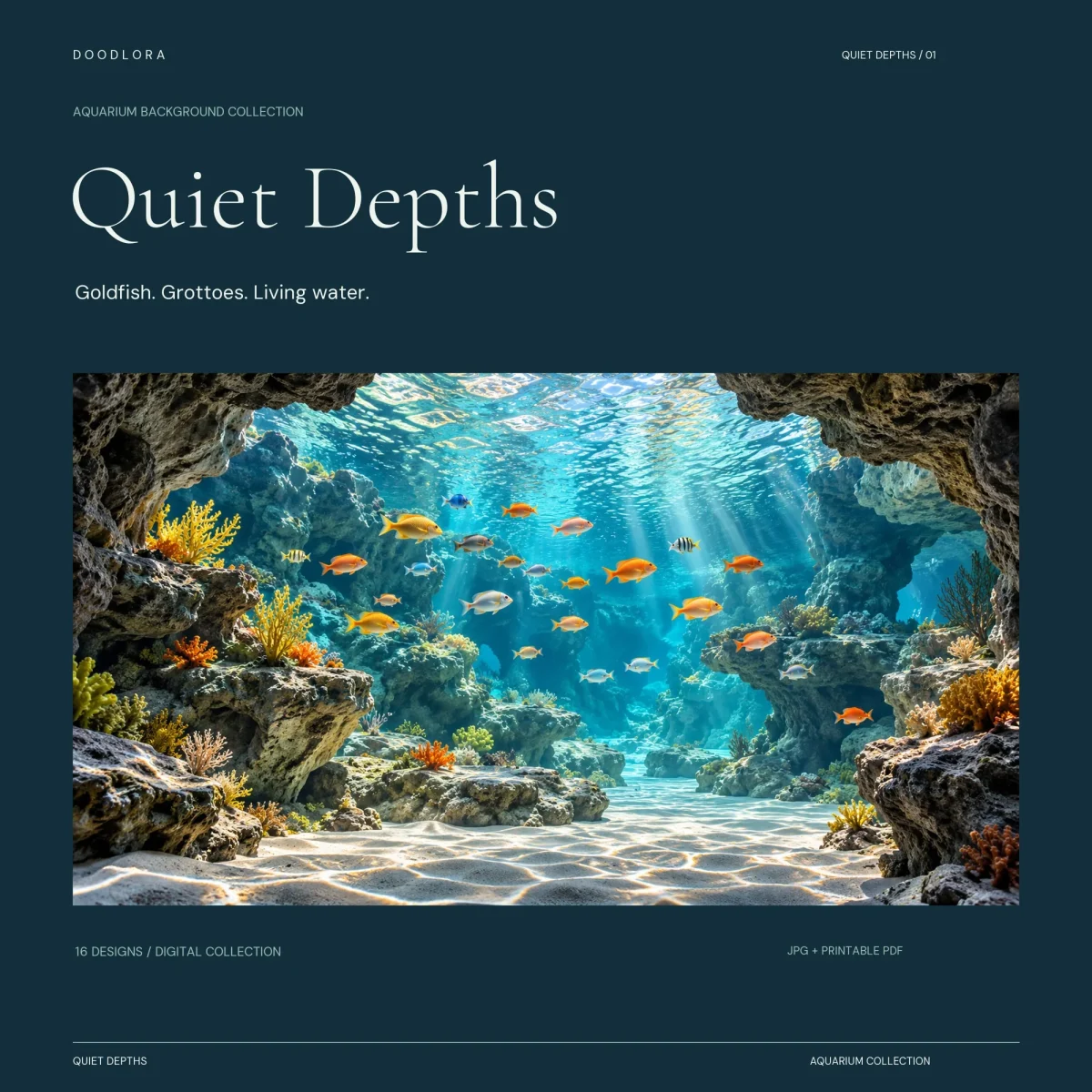
Reef grottos, designs 9 to 16. These are wider views from inside rocky caves. Arches of dark rock frame the edges, corals in yellow, orange and purple sit on the ledges, and light ripples across white sand on the floor. The fish are small and spread through the water: a mixed crowd in Luminous Grotto, a school of silver fish in Silver Shoal, purple corals in Lavender Reef, a line of orange fish passing under a rock arch in Golden Current. Sapphire Chamber and Twilight School are deeper and bluer than the rest.
Design-Index.csv gives every scene’s name and number, and the PDFs keep the same order.
Which JPG to use
Every scene comes as three JPGs, and they are the same picture at different sizes, not 48 different images.
- 3840 x 2160 and 1920 x 1080 are full 16:9 frames, the shape of most monitors, laptops and TVs. Pick the one that matches your screen.
- 3600 x 3600 is a square cut from the middle of the wide frame. It keeps the full height but loses the sides, so a fish near the edge can be cut in half. In the square Blue Glass, the big goldfish loses the tip of its tail and the two smaller ones are sliced off at the right edge.
There is no tall, phone-shaped version, and these are still images, not moving wallpaper. All 16 scenes were made with AI. They look like underwater photographs, but none of them is a photo of a real tank. They were also enlarged to these pixel sizes from a smaller original, so the bigger files fill a bigger screen without adding finer detail.
Behind a tank or on paper
START-HERE.txt suggests a wide JPG for a printed aquarium backdrop, with a warning worth repeating: a fixed 16:9 or square image will not match every tank. Measure the back glass first, then crop or scale the file to fit before a print shop sizes it. Nothing physical comes with the download, so there is no waterproof sheet, adhesive or tank hardware.
The two PDFs are for ordinary paper, not tank-size posters. Each page holds one wide scene with white margins, about 10.3 x 5.8 inches on US Letter and 11 x 6.2 inches on A4. Print at Actual Size on landscape paper and test one page before running all 16. The dark scenes, especially Blue Glass, Silver Veils and Sapphire Chamber, put down a lot of ink.