 1 / 8
Decision Log – Decision Records, Register and Retrospective Pages
A paper decision log built around one decision per page, with the rationale given the most room, then a landscape register to see many decisions at once and a retrospective to check how each one turned out.
$2.99
Buy any 3 or more printables and save 20% at checkout.
- Download right after payment — link works for 30 days, up to 5 downloads
- Files arrive as a ZIP with your license PDF inside
- Secure checkout by Stripe · Refund policy
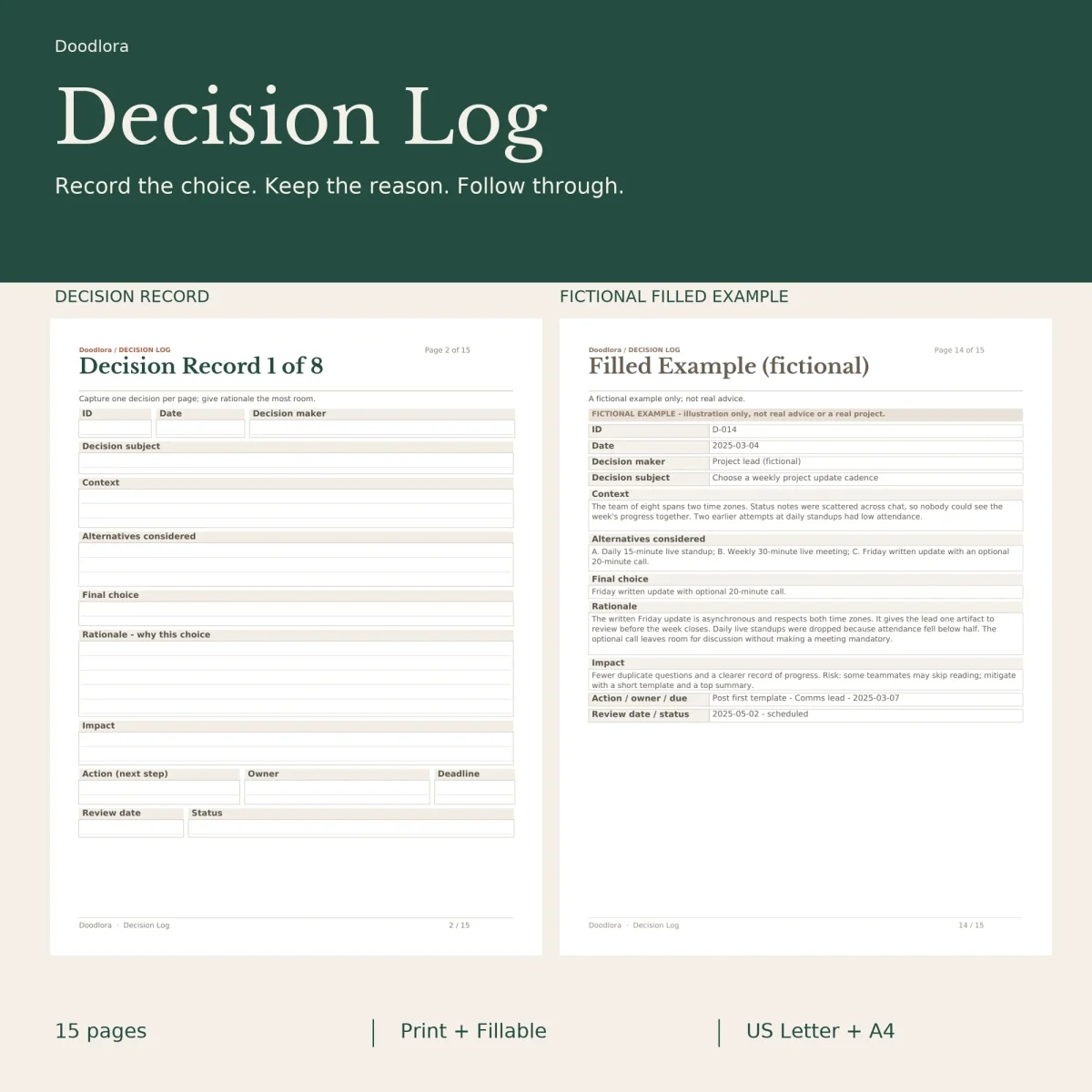
Most decisions are easy to make and hard to remember, at least the why behind them. Each record page in this decision log gives one decision a full sheet and puts the biggest box on it under “Rationale – why this choice”. Above that sit the decision subject, the context, the alternatives you weighed and the final choice; below it, the expected impact, the next action with an owner and a deadline, and a review date and status. An ID, the date and the name of the decision maker run across the top, which makes the records easy to cross-reference later.
There are eight of these records, and the guide page pitches the set at both personal and project decisions.
Seeing them all, then checking back
The two landscape register pages work as an index. Each has six tall rows for the ID and date, the decision, a short rationale, the owner, the next action with its due date, and the review status, so twelve decisions fit on the pair. Teams keeping a decision log template for a project can use the register for the quick view and the records for the detail.
The retrospective pages close the loop once the review date comes around. You write the decision ID and subject, then fill an “Expected result” column and an “Actual result” column side by side, add the evidence (data, quotes, references), the lessons learned, and the follow-up actions with an owner and a due date.
The filled example
Page 14 shows a completed record so you can see how much to write. It is a made-up case, labeled fictional, in which a team of eight across two time zones picks a Friday written update with an optional 20-minute call over daily standups, with the rationale, the risk and a review date filled in. The last page is a lined blank workspace for sketches, notes or a record that runs long.
Paper, color and files
The portrait pages and the two register pages come as separate PDFs, so print the landscape file sideways. Forest and clay prints the headings in dark green and terracotta, black and white sticks to black and gray, and warm neutral uses taupe. In the fillable files you type into the record, register and retrospective boxes, then save a copy under a new name; the guide and the example page have no fields. Print at 100% rather than fit to page.