 1 / 7
Travel Budget Template for Excel and Google Sheets: 13-Tab Trip Budget with 5 Category Tabs, a Payment Log, Packing List, Trip To Do List and Traveler Roster
A trip budget that tracks money owed as well as money planned: estimate each cost, fill in the real price once it's booked, and log deposits as you pay them. The summary shows how much of the budget is already paid, and three extra tabs cover packing, pre-trip tasks and who's coming.
$2.99
Buy any 3 or more printables and save 20% at checkout.
- Download right after payment — link works for 30 days, up to 5 downloads
- Files arrive as a ZIP with your license PDF inside
- Secure checkout by Stripe · Refund policy
One trip, one workbook: this travel budget template follows a single vacation. Most trip budgets stop at “planned vs spent”; this one also keeps track of what you’ve already paid and what’s still due, which matters when flights, hotels and tours all want deposits at different times.
One tab per kind of cost
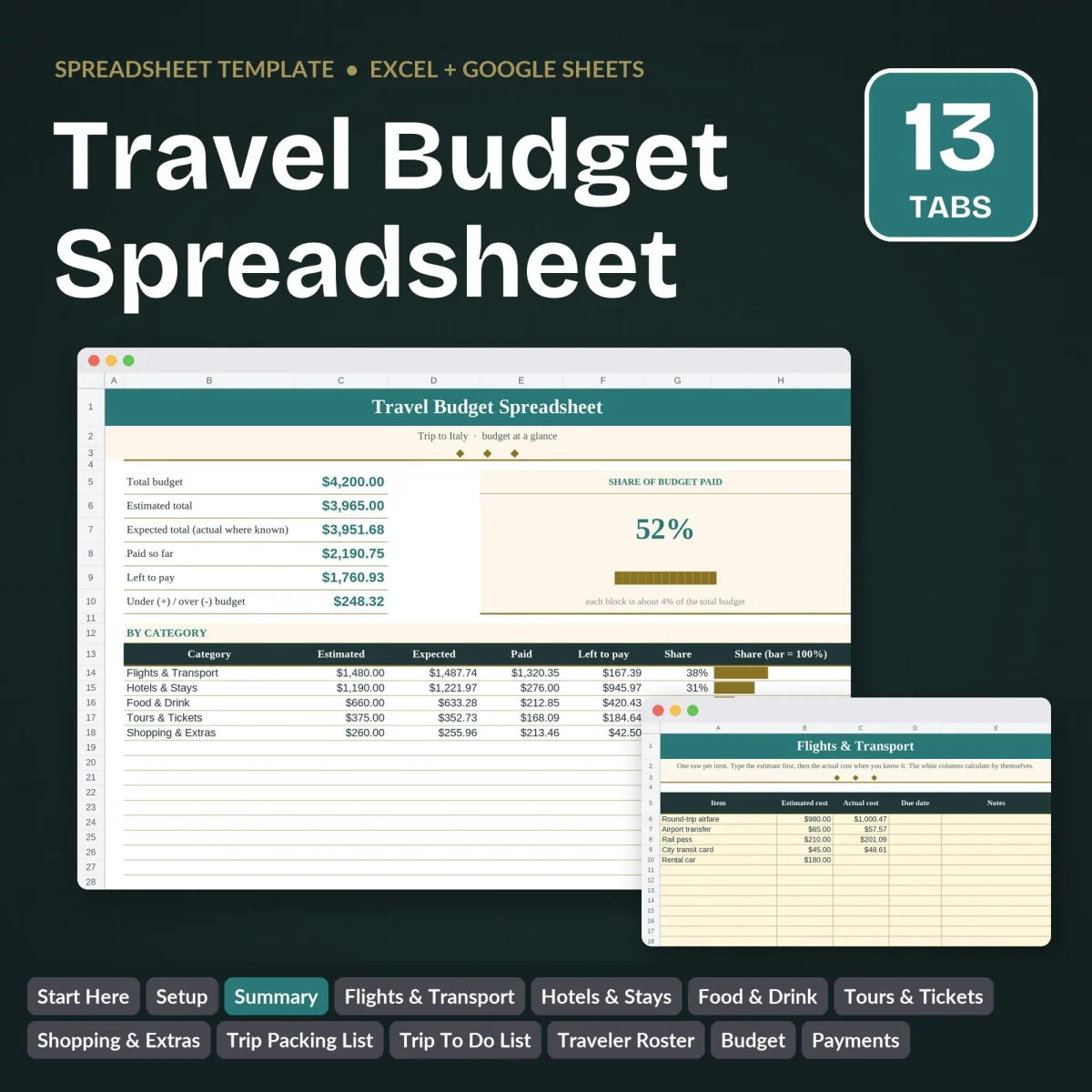
Five category tabs split the trip: Flights & Transport, Hotels & Stays, Food & Drink, Tours & Tickets, and Shopping & Extras. Each has 14 rows for items. You type the estimated cost first, then the actual cost once you’ve booked, plus an optional due date and a note. The blank copy starts you off with item names such as round-trip airfare, rail pass, tourist tax, cooking class and SIM card and data; overwrite them with your own. Category names can be changed on Setup, and the Budget and Summary tabs follow.
Paying as you go
When you pay a deposit or a bill, add a row on Payments: the date, the item (picked from a list of everything on your category tabs), the amount, a short note and the vendor’s phone or email. There’s room for 200 payments. Each item then shows Paid, Part paid or Not paid, with the paid and remaining amounts beside it.
The Budget tab gathers every item from all five tabs into one list with the difference between estimate and actual. Its Check column catches an item name used twice or a payment larger than the cost.
The summary
Summary sets your total budget against three totals: the original estimate, an expected total that uses the actual price wherever you have one, and the amount paid so far. It shows how far under or over budget you are and a bar for the share of the budget already paid. A table repeats those figures for each category with its share of the trip. In the sample Italy trip, $2,190.75 of a $4,200 budget is paid, and the expected cost comes in $248.32 under the budget.
Packing, tasks and travelers
The last three tabs aren’t about money. Trip Packing List has item, category, quantity and a Yes or No packed column. Trip To Do List holds pre-trip tasks with a due date, an owner and a done column. Traveler Roster lists each person with contact details, the deposit they’ve paid and whether they’re confirmed, which helps when you’re collecting money for a group trip. Each list has 60 rows and counts its Yes answers at the top.
Works in Excel 2010 or newer with no macros. To use Google Sheets, upload the .xlsx to Google Drive and open it there.