 1 / 7
Workout Spreadsheet for Excel: 12-Week Lifting Plan with Weekly Weight Increase, Exercise List and Workout Log with Volume in Pounds
A lifting tracker built around a simple progression: give each exercise a starting weight and a weekly percentage increase, and the plan shows where you'll be by week 12. A workout log records what you actually lifted, and the exercise list counts how often each lift shows up.
$2.99
Buy any 3 or more printables and save 20% at checkout.
- Download right after payment — link works for 30 days, up to 5 downloads
- Files arrive as a ZIP with your license PDF inside
- Secure checkout by Stripe · Refund policy
This workout spreadsheet is for strength training with a planned weekly progression. You write the program once on the Workout Plan tab, log sessions as you go, and the workbook keeps count of sets and volume. Weights are in pounds throughout.
The 12-week plan
Each plan line has a split day (Push, Pull, Legs, Upper, Lower, Full Body), an exercise picked from your Exercises list, sets, reps, a starting weight and a weekly increase as a percentage. Two columns work from those:
- Week 12 Weight adds the weekly increase eleven times to the starting weight. In the sample, a 95 lb bench press with a 2.5% weekly increase reaches 121.1 lb by week 12, and a 115 lb squat at 3% reaches 153 lb. The increase is a percentage of the starting weight each week, not compounded.
- Week 1 Volume is sets × reps × starting weight, so you can see how much total work each line asks for in the first week.
The plan shows the week 1 and week 12 numbers rather than every week in between. To find a weight for, say, week 6, the same rule applies: starting weight plus five weekly increases.
Exercise list and log
The Exercises tab holds each lift with a muscle group (Chest, Back, Legs, Shoulders, Arms, Core) and equipment (Barbell, Dumbbell, Machine, Cable, Bodyweight). Two columns count how many log entries and how many total sets each exercise has, which shows if an exercise in the plan keeps getting skipped.
The Workout Log is one row per exercise per session: date, exercise, sets, reps, weight, and an effort rating of Easy, Moderate or Hard. Volume works itself out. The log holds 200 rows.
Dashboard
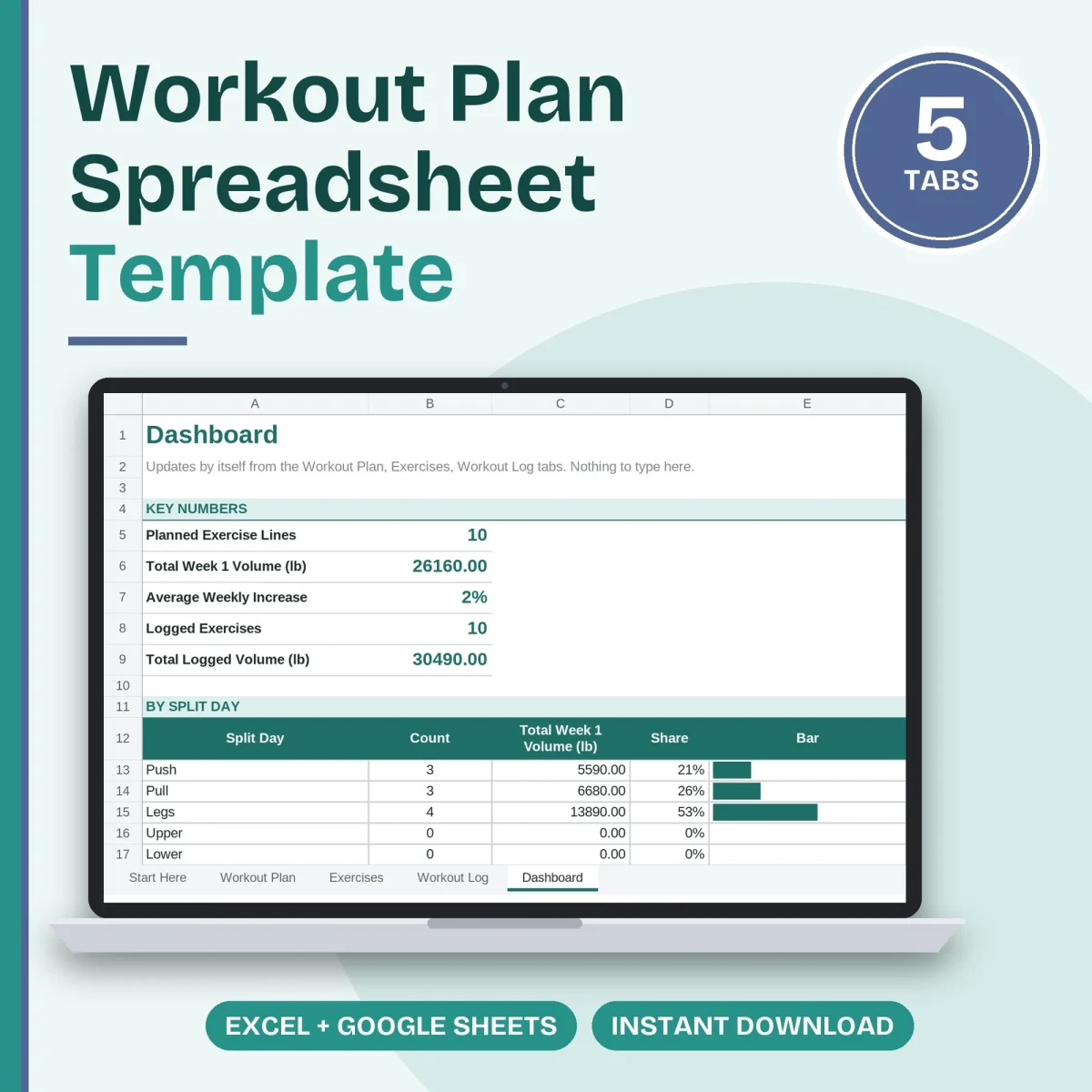
Nothing to type. It counts plan lines and log entries, totals week 1 volume and logged volume, gives the average weekly increase across the plan, and breaks week 1 volume down by split day with a text bar for each.
Sample and printouts
The sample is a three-day push, pull and legs plan with ten exercises and ten log entries from the first two weeks of January. The PDF prints those tabs and adds blank Workout Plan, Exercises and Workout Log pages to fill in by hand at the gym.
If you’d rather plan on paper, the workout planner printable has fill-in weekly training pages; this spreadsheet is the version that works out the weights and volume for you.
Any copy of Excel from 2010 on will open it. For Google Sheets, upload it to Drive and open it with Sheets.