 1 / 5
Cheetah Clipart with Seamless Spot Patterns: 30 Cheetahs, Cubs, Silhouettes, Blank Frames and Lettering
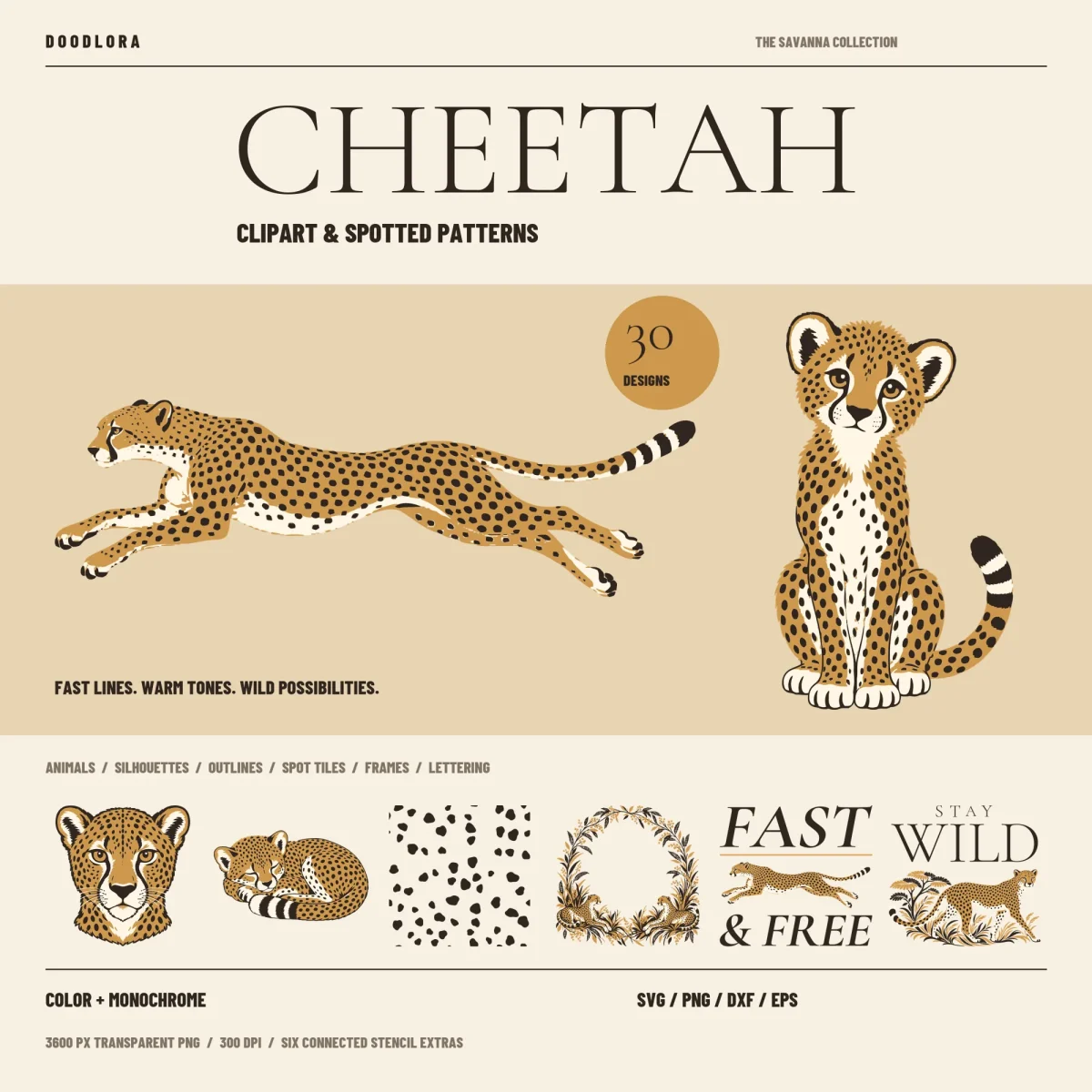
Ochre, ivory and dark espresso carry all thirty cheetah designs, from a full-stretch sprint and a mother with her cub to six repeating cheetah print tiles, two empty savanna frames and two lettered pieces. Every design also comes in monochrome, and six bonus stencil sheets turn the spot patterns into cut-out holes.
$4.99
Buy any 3 or more printables and save 20% at checkout.
- Download right after payment — link works for 30 days, up to 5 downloads
- Files arrive as a ZIP with your license PDF inside
- Secure checkout by Stripe · Refund policy
This cheetah clipart set works in a short palette of three colors: a warm ochre coat, ivory on the chest and muzzle, and a dark espresso brown for the solid round spots, the black tear marks running from the eyes, and the ringed tip of the tail. The animals are drawn in a clean, flat illustration style with crisp edges. Twelve of the thirty designs are cheetahs and cubs; the rest are shapes and pieces built from the same look, including six tiles of cheetah print that repeat edge to edge. Each design comes in savanna color and monochrome as cheetah SVG, PNG, EPS and DXF files.
Adults, cubs and the plain shapes
The six adults are a cheetah stretched flat out mid-sprint, one walking side-on, one sitting tall and gazing off to the side, one lying down with its head up, a front-facing head portrait, and one standing and looking back over its shoulder. The six cub designs are softer and rounder: a cub sitting up with fluffy fur on its head, a cub in a play bow with its tail up, a cub asleep and curled around its striped tail, a mother sitting tall with a cub leaning against her legs, two cubs side by side with their heads together, and a cub bounding forward with its mouth open.
Silhouettes 13 to 16 are flat dark shapes with no spots: running, standing, seated with the tail curled in front, and stretching with the front legs out and the tail hooked up. Designs 17 to 20 are line drawings that keep every spot, a standing cheetah in profile, a large face with whiskers, a sitting cub and a mother lying down with her cub tucked against her.
Spot tiles and stencil sheets
Tiles 21 to 26 are square cheetah print patterns, with dark spots on a transparent background: classic, airy (larger, more widely spaced spots), dense, petite (many small dots), diagonal (spots leaning one way) and organic (big rounded blobs). Each one is built to repeat. Spots that run off one side of the square come back on the opposite side, so copies placed exactly one tile apart join up. Because the background is open, the paper or fabric color becomes the ground color of the print.
The BONUS-STENCILS folder holds the reverse: for each tile, a solid dark square with spot-shaped holes and a plain border around the edge. Those sheets are meant for stenciling and don’t repeat. They come as SVG, PNG and EPS. The DXF in that folder holds the spot outlines from the matching tile, including the spots cut off at the tile’s edges, so start from the SVG or EPS if you want the bordered sheet.
Frames and lettering
Frame 27 is an open oval made of grasses, leaves and small berries, with two cheetahs lying in the grass at the bottom, facing each other. Frame 28 is a rounded-square border filled with acacia trees, plants and four cheetahs, two lying along the top and bottom edges and two standing on the sides. Both centers are empty. Design 29 stacks “FAST” over a thin gold rule, a sprinting cheetah, and “& FREE” in large italic capitals. Design 30 has “STAY” in small spaced capitals over a large “WILD”, with a cheetah walking through grass beside a small acacia. The letters are part of the artwork, so no font is needed.
Savanna color and monochrome
The savanna-color files use exactly three fills (#CE984D ochre, #FFF6E5 ivory, #2F251F espresso). The monochrome files use one near-black (#191918). On the cheetahs, cubs and frames, monochrome keeps the outlines, spots and tail rings and leaves the coat open, so the cats read like ink drawings and the material shows through. For the silhouettes, line drawings and spot tiles, which are already one color in the savanna set, the only difference is espresso brown against near-black.
Sizes after import
The formats don’t open at one shared size. PNGs are 3600 pixels square with 300 dpi in the file data, which works out to 12 inches. SVG and EPS canvases are 1000 units across without a set unit, so programs size them differently, and the DXFs are laid out on a 10-inch square in inch units. Set the final width yourself after you import. The color DXFs keep the ochre, ivory and dark shapes on separate layers, and each detailed animal is made of somewhere between 600 and 1,600 closed outlines. The silhouettes are the simple ones, one to three outlines apiece.
The guide suggests starting around 8 inches wide for a shirt, 4 inches for a decal and 6 inches for a stencil sheet. The petite and dense spots and the whiskers on the face drawings get very small at decal size, so cut a test piece on spare material before committing to a design that small.
Questions
- How do I make the spot tiles repeat without a visible seam?
- Keep each tile at its full square size and place the copies exactly one tile width apart, in rows and columns. Don't crop the tile, leave gaps, stretch it or rotate single copies. To fill a shape, build a block of tiles first and then clip it to the shape.
- Can I type a name or date inside the frames?
- Yes, in your own design program. The centers of the oval frame and the label frame are left empty on purpose, with no text box or placeholder words, so you add your own text on a layer above.