 1 / 4
Panther Clipart: 30 Prowling Panthers, Portraits, Cubs, Blank Badges and Claw Marks in Three Palettes
Thirty sleek black big cats drawn as bold two-tone graphics, with gold or purple picking out the muscles, whiskers and eyes, plus cubs, paw prints, claw slashes and six badges with an empty ribbon. Each design comes in black-gold, black-purple and a one-color black version.
$4.99
Buy any 3 or more printables and save 20% at checkout.
- Download right after payment — link works for 30 days, up to 5 downloads
- Files arrive as a ZIP with your license PDF inside
- Secure checkout by Stripe · Refund policy
This panther clipart treats a black big cat the way a strong graphic emblem would: a solid black body with gold or purple slashes tracing the shoulders, the ribs of muscle, the whiskers and the eyes, all held inside a heavy outline. There are no gradients and no soft shading, just two flat colors, which keeps every design crisp from a sticker to a sign. The same 30 designs are saved three times over, as black-gold, black-purple and a plain black monochrome, so you can pick whichever pair of colors suits the project.
Each of those palettes is there as panther SVG, PNG, EPS and DXF files, which is 360 artwork files in all.
The 30 designs by group
The numbers match Design-Index.csv and the start of each file name.
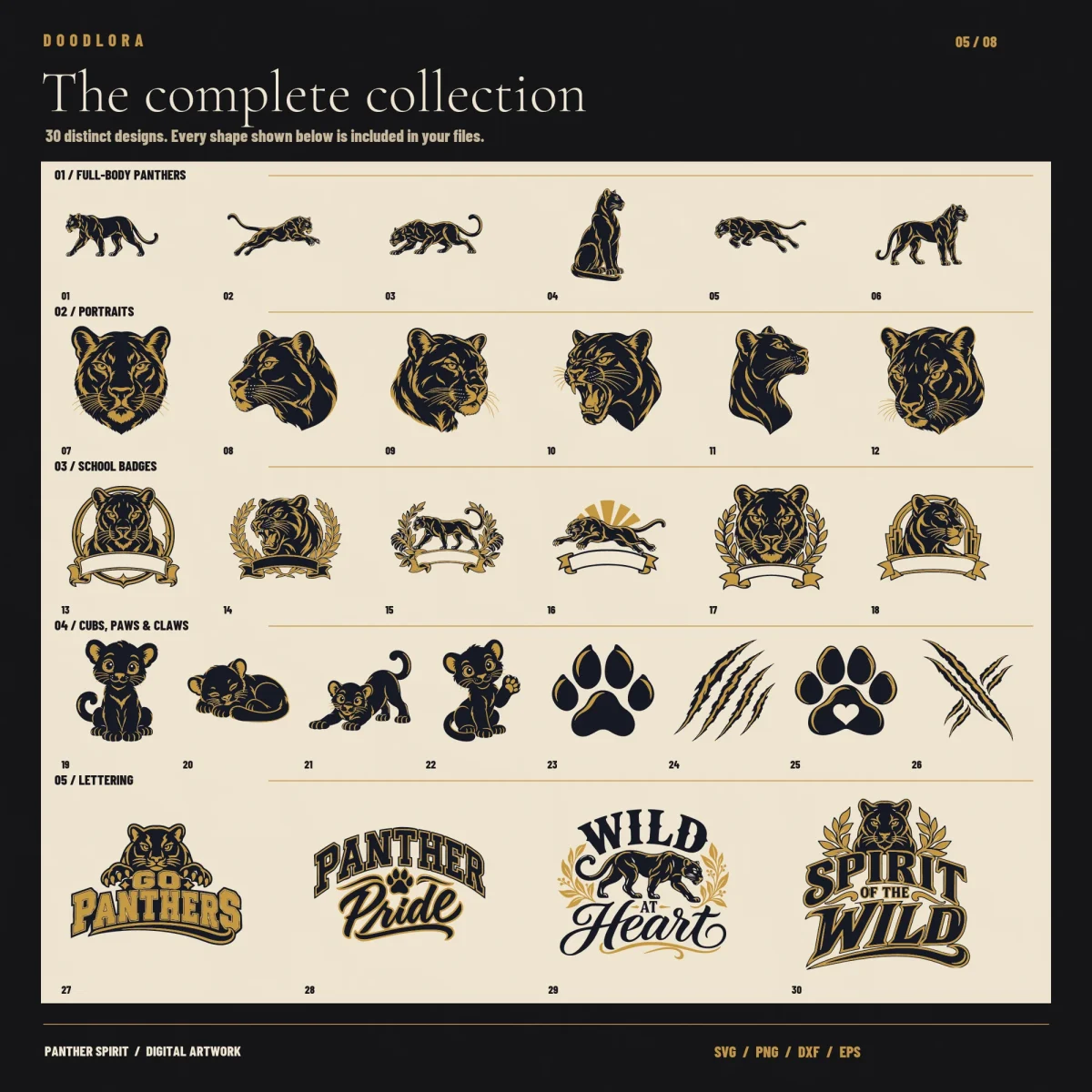
- Full-body cats (01–06): walking with the tail curled, mid-leap with all four legs stretched out, crouched low and stalking, sitting tall with the tail wrapped at its feet, running flat out, and standing side-on with the head up.
- Portraits (07–12): a front-facing head with a level stare, a side profile, a three-quarter view, a roaring head with fangs bared, an alert profile with the neck raised, and a lowered head with a hard, steady stare.
- Badges (13–18): a head inside a round frame, a roaring head between laurel branches, a walking panther between leafy sprays, a leaping panther in front of a burst of sun rays, a front head in a laurel wreath, and a profile inside a stepped art-deco arch. Every badge sits on a ribbon left empty for your own words.
- Cubs (19–22): round-eyed and much softer than the adults. One sits with its tail curled round, one is asleep in a ball, one is down in a play bow with its tail in the air, and one waves a paw.
- Paws and claws (23–26): a plain paw print, four diagonal claw slashes, a paw print with a heart cut out of the pad, and two sets of slashes crossed into an X.
- Lettered (27–30): four designs where bold block or script words wrap around a panther head, a walking panther or a paw print. The lettering is already turned into shapes, so you don’t need any font to open them.
Three palettes, one drawing
Black-gold and black-purple use the same shapes with only the accent color swapped: a near-black (#171923) with gold (#C69842) or with purple (#8057BE). Monochrome keeps just the black, and the places where gold or purple sat become transparent, so a cream T-shirt or a white sticker shows through as the fur lines.
That works for nearly everything, with two exceptions. In 16 the sun rays behind the leaping cat are drawn only in the accent color, so they disappear in monochrome and you’re left with the cat over its ribbon. In 29 the leafy sprigs and the swash under the words go the same way. Use one of the two-color versions if you want them.
Adding a name to a badge
The ribbons on 13, 15, 16, 17 and 18 are open bands outlined in black, and 14 has a solid black band under the roaring head. Nothing is written in any of them. Add your text on a layer above in your own design program, pick a font you’re allowed to use, and convert the words to outlines before cutting.
Sizes and cutting files
The SVG and EPS canvases are 1000 units square with no physical size attached, so set the width after you import. The PNGs are 3600 pixels square with a transparent background and 300 dpi in their file data, and the artwork fills most of the square. The DXFs are saved as R2010 in inches on a 10-inch square, where each design measures about 8.8 inches across its longer side. They hold closed outlines only, 12 to 208 per file in the two-color versions and 8 to 124 in monochrome, so they look like line drawings when they open.
The guide’s starting widths are 10 to 11 inches for a shirt, 4 to 6 inches for a decal and 12 inches for a sign. Whiskers, claw tips and the thin gold lines in the fur are the finest parts, so cut a small piece of the design you picked on a scrap of your material, at the size you plan to use, before the real one.
Questions
- Can I put my own name on the badges?
- Yes, that's what the six badges are for. The ribbon on 13, 15, 16, 17 and 18 is an open band with nothing in it, and on 14 it's a solid black band. Type your words in your own design program, place them over the ribbon and convert them to outlines before you cut or send the file anywhere.
- What happens to the gold or purple in the monochrome files?
- It becomes empty space. The black shapes stay and the colored highlights turn into transparent gaps, so the fur lines show whatever you put the design on.